The Kois Deprogrammer: A Patient's Guide
A Kois Deprogrammer is a small, retainer-like appliance worn for two to four weeks so your jaw muscles can relax and your jaw can settle into its natural closing position. Only one lower front tooth touches it; your back teeth never meet.
It lets your dentist see your true bite before deciding whether any treatment is needed, and it often eases jaw and muscle soreness along the way. Wear it as much as you can, take it out only to eat and clean your teeth, and bring it to your follow-up.
What a Kois Deprogrammer is
A Kois Deprogrammer is a small, removable, retainer-like appliance that fits over your upper teeth and lets your jaw find its natural resting position. It was developed by Dr. John Kois, a prosthodontist and educator in Seattle, as a simple way to take the guesswork out of diagnosing and treating bite problems.
It looks a little like a clear retainer, with one important difference: a small, flat platform sits just behind your upper front teeth. When you close your mouth, only your lower front teeth touch that platform. Your back teeth never meet. That single feature is what makes it work.
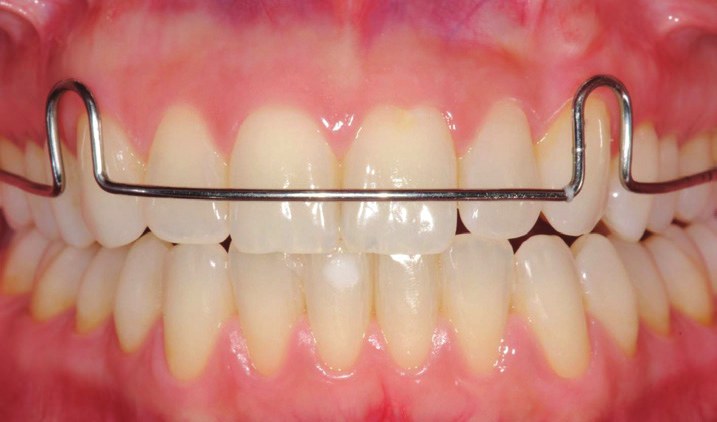
The appliance in place, seen from the front. The wire runs across the upper front teeth, and the upper and lower back teeth are held just apart.
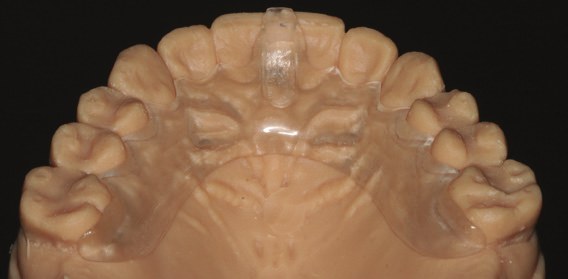
The appliance on a plaster model of the upper teeth. The small raised block at the front is the platform the lower front tooth rests on.
You wear it for two to four weeks, as close to around the clock as you can, before a follow-up visit where your dentist checks what your bite has done. It is a diagnostic tool first and a treatment tool second, and for many patients it is the step that decides what, if anything, needs to be done next.
Why your dentist recommended it
Your jaw has two "home" positions, and they don't always match. One is where your teeth fit together best. The other is where your jaw joints sit most comfortably in their sockets, with the muscles relaxed. In a well-balanced mouth these are the same place. In many mouths they are not.
When they differ, your muscles learn a workaround. Every time you close, they steer the jaw slightly forward, sideways, or back so the teeth can lock together, even though that pulls the joints out of their relaxed position. This happens thousands of times a day, entirely without your noticing. Over years, it becomes a deeply ingrained habit: muscle memory, in the most literal sense.
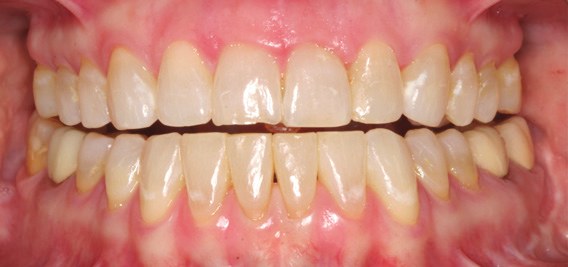
Teeth closed in the everyday, tooth-guided bite, with no appliance in place. This is the position the deprogrammer temporarily takes out of play.
That habit can cause problems, or hide them. It can lead to tired or sore jaw muscles, morning headaches, clicking joints, teeth that chip or wear unevenly, fillings and crowns that keep breaking, and a bite that feels "off" but that you can't quite describe. It also makes it hard for a dentist to tell what your bite would be like if the muscles weren't steering it.
"Deprogramming" means temporarily erasing that habit so your jaw can close where the joints and muscles want it to, rather than where the teeth force it to. Once the muscles have let go, your dentist can see the real relationship between your upper and lower teeth and decide whether anything needs to change.
How it works
The appliance works by taking your back teeth out of the equation. When you close with it in, one of your lower front teeth touches the small flat platform, and that is the only contact in your whole mouth. Because the platform is smooth and level, there is no groove or slope for the jaw to slide into; the lower teeth can land anywhere on it. With nothing to lock onto, the muscles have no reason to steer, and over a period of days they stop doing so.
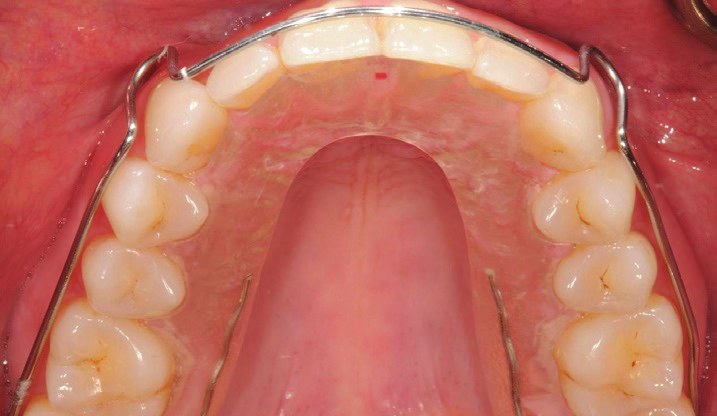
Seen from below: the appliance covers the roof of the mouth, and the platform sits just behind the upper front teeth. The small red mark is where the lower front tooth lands.
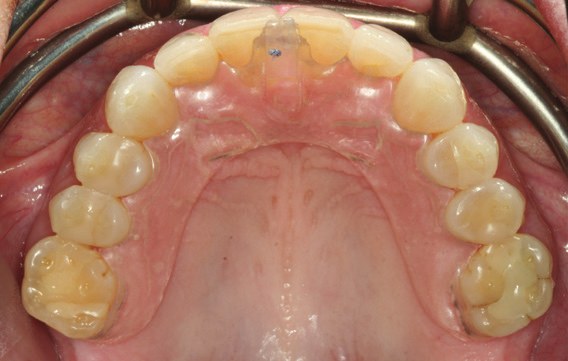
A clear, wire-free version of the appliance. Some are made with a retaining wire, some without; both work the same way.
As the muscles relax, the jaw joints drift back to their seated, relaxed position. Your dentist calls this centric relation. It is the one jaw position that can be found again and again, regardless of how your teeth are shaped, which is why it is the reference point for diagnosing bite problems and planning major dental work.
You will know the deprogramming is complete when, every time you take the appliance out and close your teeth together, they meet in the same spot, without you thinking about it. Your dentist checks for this at your follow-up visit by watching where your lower tooth lands on the platform. Until that happens, the muscles are still holding on to the old pattern and the appliance needs more time.
One thing to watch for from the first days: when you take the appliance out, your teeth will probably meet differently than they used to, often with a single tooth touching first. Make a note of which tooth it is. That change is the deprogrammer doing its job, and it is exactly what your dentist wants to know about.
What it's used for
Dentists reach for the deprogrammer in four main situations:
- Diagnosing a bite problem. After deprogramming, your dentist has you close on the appliance and then, with it removed, checks which teeth touch first. If the first contact is in a different place from your usual bite, there is a slide between the relaxed jaw position and the tooth-guided one. How big that slide is, and in which direction, tells your dentist whether your bite is the cause of wear, pain, or breakage, and whether it needs correcting.
- Planning crowns, veneers, implants, or a full rebuild. Restorations are built to fit a specific bite. If they are made to fit a bite that is being steered by muscle habit, they can end up fighting the jaw joints, which leads to discomfort and breakage. Taking the bite records with a deprogrammed jaw means the new teeth are built to a stable, repeatable position.
- Jaw and facial muscle pain. For people with sore jaw muscles, tension headaches, or clicking joints, a few weeks in the appliance often brings relief, because the muscles are finally allowed to rest. That relief is useful on its own, and it tells your dentist that the bite is at least part of the problem.
- Clenching and grinding. Wearing the appliance helps separate out whether tooth wear is coming from a bite that forces the jaw into an awkward path, from a bite that is simply unstable, or from grinding driven by stress or sleep, each of which is treated differently.
In many cases the deprogrammer does double duty: it diagnoses the problem and, by resting the muscles, starts to relieve it.
What to expect
The fitting visit. Your dentist takes an impression or digital scan of your upper teeth and sends it to a lab, where the appliance is made from clear acrylic (milled or 3D-printed, depending on the lab). At a second short visit it is tried in, and the platform is adjusted so your lower front teeth meet it evenly and your back teeth are just clear of each other. You will be shown how to put it in and take it out, and given written wearing instructions.
Wearing it. You will get written instructions from the office. The standard Kois Center guidance is:
- Wear it for two to four weeks, as much of the day and night as you can. The more hours it is in, the sooner the jaw muscles let go and settle into a closing position you go to every time.
- Take it out to eat and to brush and floss, then put it straight back in. It is also fine to leave it out for a special occasion or when wearing it would get in the way of daily life, but keep those breaks short.
- Each time you take it out and close your teeth, notice which tooth touches first and make a note of it. It will probably be a different tooth than before.
- Do not leave it out for long stretches. A few hours without it is enough for the muscles to slip back toward the old pattern, and the deprogramming has to start again.
- Wear it to your follow-up appointment, and bring its case. Your dentist needs it in your mouth to take the bite record, so the visit cannot go ahead without it.
The follow-up visit. The deprogrammer has done its job when, every time you take it out and close, your teeth meet in the same spot, and any symptoms you had before, such as sore muscles, headaches, or a bite that felt off, have settled. Your dentist confirms this by watching where your lower tooth lands on the platform, records your bite with the appliance in place, and then checks which tooth touches first when it comes out. From there, the conversation turns to what, if anything, to do about what was found: nothing at all, a minor adjustment of a few high spots, orthodontics, or restorative work. If you are not fully deprogrammed yet, you will be asked to wear it a while longer.
What it feels like, and practical tips
The first two or three days are the hardest. The appliance feels bulky, your tongue keeps finding it, and talking takes some practice. Almost everyone adapts within a week.
- Speech. Expect some change in your speech at first. Within a few days your tongue and jaw muscles adapt and it disappears. Reading aloud for a few minutes at a time speeds this up.
- Saliva. Your mouth may produce more saliva for the first day or two. This settles on its own.
- Chewing-muscle soreness. Some soreness in the chewing muscles is common early on and goes away as the muscles relax. Soreness or discomfort that develops later, or keeps getting worse, is a reason to take the appliance out and call.
- Sore lower front teeth. If you clench on the appliance, the lower tooth resting on the platform can become tender. Try to let your jaw hang loosely rather than pressing.
- Jaw and bite sensations. As the muscles let go, your jaw may feel like it sits in a slightly different place, and when you take the appliance out your teeth may not fit together the way they used to. That is the point of the process, and it is temporary.
- Sleep. Most people sleep fine with it in. If you wake to find it on the pillow, tell your dentist; the fit may need adjusting.
- Eating. Take it out to eat. Rinse it and put it back in as soon as you are done.
- Cleaning. Brush it gently with a small amount of toothpaste every time you brush your teeth, at least twice a day, and rinse it with warm (not hot) water. Hot water can warp it. When it is out of your mouth, keep it in its retainer case.
Take it out and call the office if soreness or discomfort develops and does not ease off, if the appliance cracks or a piece breaks off, if it becomes loose or painfully tight, or if your back teeth start touching while it is in (the platform may need adjusting). Do not try to push through pain with it in; a quick adjustment usually solves the problem.
How it differs from a night guard
A night guard and a deprogrammer can look alike, but they are built to do different things.
| Kois Deprogrammer | Typical night guard | |
|---|---|---|
| Main purpose | Diagnose the bite; relax the muscles so the jaw can be assessed | Protect teeth from the forces of grinding |
| Where teeth touch | Only the lower front teeth, on a small platform | All the teeth, across a flat or lightly contoured surface |
| When it's worn | Day and night (or as directed) for a few weeks | Night only, indefinitely |
| What happens after | A follow-up visit to read the results and plan treatment | Ongoing wear; replaced when it wears out |
| Long-term use | Not intended for it | Designed for it |
Because the deprogrammer rests the muscles so effectively, it is sometimes prescribed for short stretches to calm a flare-up of jaw pain. But it is not a substitute for a night guard, and it should not be worn for months without your dentist's supervision, since a long period with the back teeth out of contact can let them shift.
Frequently asked questions
Does it hurt? No. It is a passive appliance; nothing is being pushed or moved. Some muscle tenderness in the first few days is normal, much like a muscle you haven't stretched in a while.
Will it change my bite? Usually only by a very small amount, though the improvement in how your bite feels can be clearly noticeable. The deprogrammer itself changes where your muscles put your jaw, not where your teeth are. Any lasting change comes from treatment your dentist does afterward, and only with your agreement.
Why can't my dentist just adjust my bite without it? Because the bite your dentist can see in the chair is the one your muscles are steering. Adjusting that bite can make things worse, since the teeth are being fitted to an unstable jaw position. The deprogrammer removes the steering first, so the adjustment is made to the right target.
What if I leave it out for a while? After a few hours out of your mouth, your chewing system adapts back toward your original bite and the deprogramming has to start again. Tell your dentist if this happens; your follow-up may need to be moved.
Can I wear it while eating? Most dentists say no, because the platform is not designed for chewing and food gets trapped underneath. Take it out, eat, rinse it, and put it back.
What happens if the test shows my bite is fine? Then you have good news and a clear answer. The deprogrammer rules things out as reliably as it rules them in, and many patients leave the follow-up with no further treatment needed.
What if I decide not to go ahead with treatment afterward? That is always your choice. Within a few hours of leaving the appliance out, your chewing system adapts back to your original bite, and nothing about the process commits you to anything further.
Do I need to bring it to my appointment? Yes, and you should be wearing it when you arrive. Your dentist takes the bite record with the appliance in place, so the visit cannot go ahead without it.
Will my insurance cover it? Sometimes, usually as a diagnostic appliance or under TMJ benefits, but plans vary widely. Ask your office for a pre-treatment estimate.
Questions to ask your dentist
- What are you hoping to learn from the deprogrammer in my case?
- How many hours a day should I wear it, and should I sleep in it?
- How long do you expect I'll need to wear it before the follow-up?
- What are the possible outcomes, and what would treatment look like for each?
- If my jaw pain improves while wearing it, what does that tell us?
This article is for general education and does not replace an examination. Your dentist can tell you whether a Kois Deprogrammer is the right step for your bite, your jaw, and your symptoms.
Sources
- The Kois Deprogrammer, patient handout, Kois Center, LLC (2023): wearing period, what to expect, bite change, care instructions, and the photographs
- Patient Instructions: Kois Deprogrammer, Kois Center, LLC: how the appliance is built, wearing and care instructions, when to call
- Kois Deprogrammer Appliance, Kois Center website: what the appliance diagnoses and how it works
Photos courtesy of Kois Center, LLC.
Wearing and care card
Wear it for two to four weeks, as much of the day and night as you can.
Take it out only to eat and to brush and floss, then put it straight back in. Short breaks for a special occasion are fine; a few hours out lets the muscles slip back.
Each time you take it out, close your teeth and note which tooth touches first.
Clean it by brushing gently with a little toothpaste every time you brush, and rinse with warm (not hot) water. Keep it in its case when it is out.
Wear it to your follow-up and bring the case. The bite record is taken with it in place.
Take it out and call the office if soreness or discomfort develops and does not ease, if it cracks or breaks, if it is loose or painfully tight, or if your back teeth start touching while it is in.
Guides are general education; an examination is needed for individual advice.
Prepared with AI assistance and reviewed for clinical accuracy by Dr. Mahmood Loul, DDS on October 27, 2026.
Sources
- Kois Deprogrammer Appliance — Kois Center, LLC
- Kois Deprogrammer Appliance — Kois Center, LLC
- Kois Deprogrammer Appliance — Kois Center, LLC
- Kois Deprogrammer Appliance — Kois Center, LLC
- Kois Deprogrammer Appliance — Kois Center, LLC
- Kois Deprogrammer Appliance — Kois Center, LLC
- Kois Deprogrammer Appliance — Kois Center, LLC
- Kois Deprogrammer Appliance — Kois Center, LLC
- Kois Deprogrammer Appliance — Kois Center, LLC
- Kois Deprogrammer Appliance — Kois Center, LLC
- Kois Deprogrammer Appliance — Kois Center, LLC
- Kois Deprogrammer Appliance — Kois Center, LLC
- Kois Deprogrammer Appliance — Kois Center, LLC
- Kois Deprogrammer Appliance — Kois Center, LLC
- Kois Deprogrammer Appliance — Kois Center, LLC
- Kois Deprogrammer Appliance — Kois Center, LLC
- Kois Deprogrammer Appliance — Kois Center, LLC
- Kois Deprogrammer Appliance — Kois Center, LLC
- Kois Deprogrammer Appliance — Kois Center, LLC
- Kois Deprogrammer Appliance — Kois Center, LLC
- Kois Deprogrammer Appliance — Kois Center, LLC
- Kois Deprogrammer Appliance — Kois Center, LLC
- Kois Deprogrammer Appliance — Kois Center, LLC
- Kois Deprogrammer Appliance — Kois Center, LLC
- Kois Deprogrammer Appliance — Kois Center, LLC
- Kois Deprogrammer Appliance — Kois Center, LLC
- Kois Deprogrammer Appliance — Kois Center, LLC
- Kois Deprogrammer Appliance — Kois Center, LLC
- Kois Deprogrammer Appliance — Kois Center, LLC
- Kois Deprogrammer Appliance — Kois Center, LLC
- Kois Deprogrammer Appliance — Kois Center, LLC
- Kois Deprogrammer Appliance — Kois Center, LLC
- Kois Deprogrammer Appliance — Kois Center, LLC
- Kois Deprogrammer Appliance — Kois Center, LLC
- Kois Deprogrammer Appliance — Kois Center, LLC
- Kois Deprogrammer Appliance — Kois Center, LLC
- Kois Deprogrammer Appliance — Kois Center, LLC
- Kois Deprogrammer Appliance — Kois Center, LLC
- Kois Deprogrammer Appliance — Kois Center, LLC
- Kois Deprogrammer Appliance — Kois Center, LLC
- Kois Deprogrammer Appliance — Kois Center, LLC
- Kois Deprogrammer Appliance — Kois Center, LLC
- Kois Deprogrammer Appliance — Kois Center, LLC
- Kois Deprogrammer Appliance — Kois Center, LLC
- Kois Deprogrammer Appliance — Kois Center, LLC
- Kois Deprogrammer Appliance — Kois Center, LLC
- Kois Deprogrammer Appliance — Kois Center, LLC
- Kois Deprogrammer Appliance — Kois Center, LLC
- Kois Deprogrammer Appliance — Kois Center, LLC
- Kois Deprogrammer Appliance — Kois Center, LLC
- Kois Deprogrammer Appliance — Kois Center, LLC
- Kois Deprogrammer Appliance — Kois Center, LLC
- Kois Deprogrammer Appliance — Kois Center, LLC
- Kois Deprogrammer Appliance — Kois Center, LLC
- Kois Deprogrammer Appliance — Kois Center, LLC
- Kois Deprogrammer Appliance — Kois Center, LLC
- Kois Deprogrammer Appliance — Kois Center, LLC
- Kois Deprogrammer Appliance — Kois Center, LLC
Sources were current when this guide was last updated.
Educational content, not a diagnosis. Please contact the studio to discuss your own situation.